cform
Module(s): vncanvas-base, vncanvas-cform
Description: Creates a container for canvas forms elements. All cforms are placed
on a stack.
- Note: Technically, you can add any element to a cform, but limit usage to actual cform elements (e.g. button).
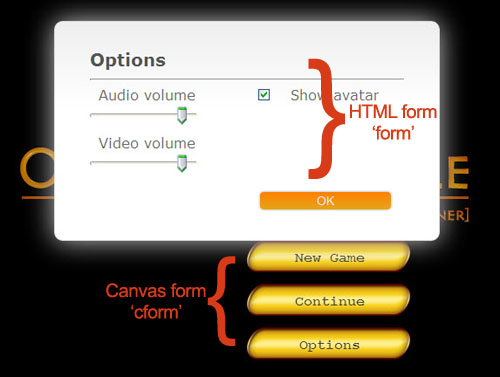
- Cform is a canvas form to emulate the default HTML form. To create a default form, use 'form'.
cform, [array_of_elements] |
Create a form layout. Upon creation, the cform is automatically shown. The array is arranged as follows: - First entry is a form_id to identify the cform. - Second entry indicates modal or non-modal form. Modal forms pause execution when shown, while non-modal forms (useful for HUDs and image maps) does not block execution and continues to next line. - Next entries are element-parameters pair. (see forms elements) |
cform, "action" |
Performs given action on the
form on top of the stack. Valid actions are: "show", "hide", "close", "default" "close" removes it from the stack. "default" reverts back to the style in configuration file. |
cform, "CSS_font_style" |
Sets a global style for all forms. Declare as "weight size font-family color" in the given order. The default cform style may be set in configuration file. |
cform, "form_name" |
Puts the given form on top of
the stack and shows it. (May or may not be useful.)
|
This sets a global style for the form font, then creates a form that allows the user to
start a new game, continue from a previous save, or set options.
chapter = [

	...
	label, "start",
	/* This line sets the font style */
	cform, "bold 16px 'Courier New' #404040",
	/* This creates a form named "top_menu".
	   Game execution is paused when a form is shown.*/
	cform, [ "top_menu", true,
		button, {name:"New Game", x:360, y:300, base:"base.png", hover:"hover.png", link:[jump, "intro"]},
		button, {name:"Continue", x:360, y:350, base:"base.png", hover:"hover.png", link:[jump, "restore"]},
		button, {name:"Options", x:360, y:400, base:"base.png", hover:"hover.png", link:[jump, "option"]},
	],

	label, "option",
	/* Set options here, form is not hidden or closed, then returns back to start */
	jump, "start",

	label, "restore",
	/* Form is closed, then saved game is loaded here */
	cform, "close",
	checkpoint, "load",

	label, "intro",
	/* Form is hidden here, then continues to start a new game */
	cform, "hide",
	/* Start a new game */
	...
];
The following is a non-typical use of forms as an imagemap. This uses an overlay image to create a map,
then uses a form with buttons to indicate locations the user can select.
chapter = [

	...
	overlay, {image:"map.jpg"},
	cform, [ "map", false,
		button, {name:"Location1", x:100, y:100, base:"location1.png", showText:false, link:[set, {goTo:"location1"}]},
		button, {name:"Location2", x:200, y:100, base:"location2.png", showText:false, link:[set, {goTo:"location2"}]},
		button, {name:"Location3", x:200, y:200, base:"location3.png", showText:false, link:[set, {goTo:"location3"}]},
	],
	...
	/* the form is just hidden, so it can be used again later. */
	cform, "hide",

	/* after selection, check "goTo" variable to get where player wants to go */
	jump, {goTo:"location1", label:"go_to_location1"},
	jump, {goTo:"location2", label:"go_to_location2"},
	jump, {goTo:"location3", label:"go_to_location3"},
	...
	label, "go_to_location1",
	...
	label, "go_to_location2",
	...
	label, "go_to_location3",
	...
];
Note that by just hiding the form (instead of close) and not using fixed jumps in the links portion
(as in the first example), this imagemap can be shown later, and then the user variable checked again
to jump at a different label location.