form
Module(s): vncanvas-base, vncanvas-form
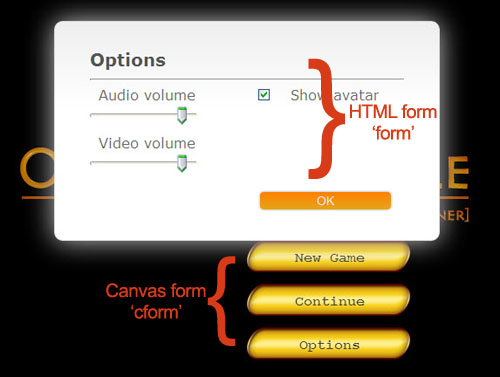
Description: Creates a HTML form.
- Only a subset of HTML form elements are supported, i.e. only those that have potential use in a visual novel.
- Use CSS to style the HTML form.
- Caution: As of the moment, the new form elements are not totally supported by all browsers.
form, [array_of_elements] |
Create a form layout. Upon creation, the form is automatically shown. The array is arranged as follows: - First entry is a form_id to identify the form. - Next entries are element-parameters pair. (see forms elements) Supported elements are: - checkbox (a box with a check mark) - fieldset (use this to group and layout the form) - input (an input text box) - radio (select-one button) - select (a dropdown list) - slider (a number slider) - spinbox (a number incrementer/decrementer) - textarea (a multiline input text box) |
A form named 'Options' is created and styled using CSS as shown below.
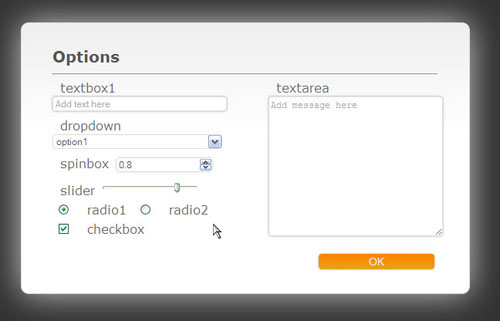
chapter = [

	...
	form, [ "Options",
		fieldset, "left_controls",
		input, {name:"textbox1", placeholder:"Add text here"},
		select, {name:"dropdown", options:["option1", "val1", "option2", "val2"], bind:"g_DropdownTest"},
		spinbox, {name:"spinbox", min:0, max:1, step:0.05, bind:"g_Volume"},
		slider, {name:"slider", min:0, max:1, step:0.05, bind:"g_Volume"},
		radio, {name:"radio", value:"radio1", bind:"g_RadioTest"},
		radio, {name:"radio", value:"radio2", bind:"g_RadioTest"},
		checkbox, {name:"checkbox", bind:"g_CheckboxTest"},
		fieldset, "right_controls",
		textarea, {name:"textarea", placeholder:"Add message here"},
		fieldset, "bottom_controls",
		submit, {name:"OK"},
	],
	...
];